Truck dispatch software built for dispatch companies
Run every carrier you dispatch from one board: loads, rate confirmations, documents, invoices and weekly statements. Carriers your sales agents sign arrive with your dispatchers with the sales notes attached, so nobody asks the owner the same questions twice.
Trial includes 2 sales agents and 1 dispatcher. No credit card.
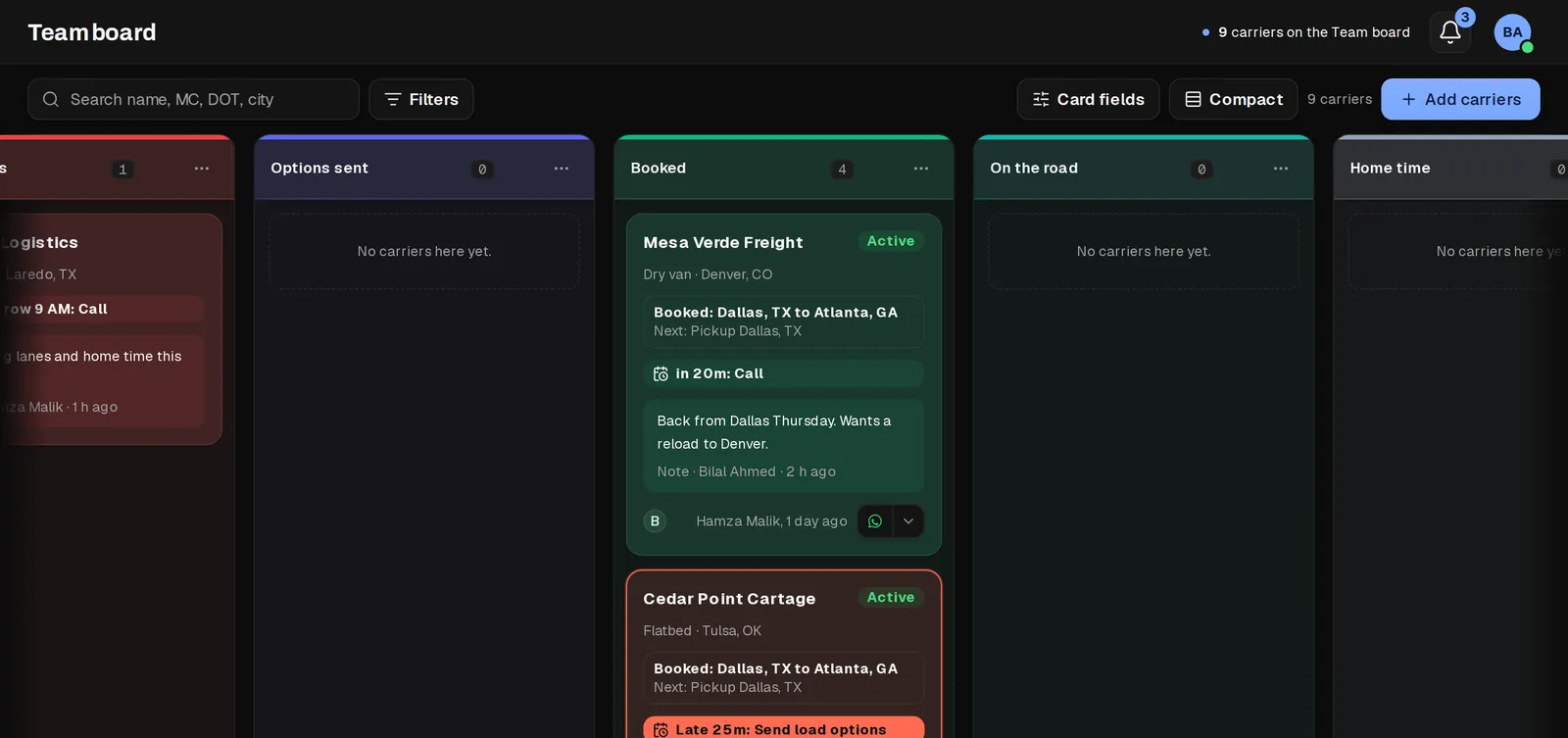
One board for every carrier you dispatch
Each carrier is a card. The columns are your own stages, for example New, Confirming, Needs loads, Options sent, Booked, On the road and Home time. Drag a card when the status changes, or move it from your phone.
Every card shows the next step and when it is due. A card that is due rises to the top of its column, and a late one is marked in red with how late it is, so a dispatcher never has to scan forty carriers to find the one waiting for load options.
- Color labels your whole team shares, such as Slow to pay or Team drivers, and a filter for each one
- Every column is also a filter in the toolbar, and a Compact switch fits more carriers on screen
- Reminders appear only when a dispatcher sets one, so the board never fills with automatic noise
- A recycle bin and an archive, so a removed carrier or document can come back
Loads with the numbers dispatchers check
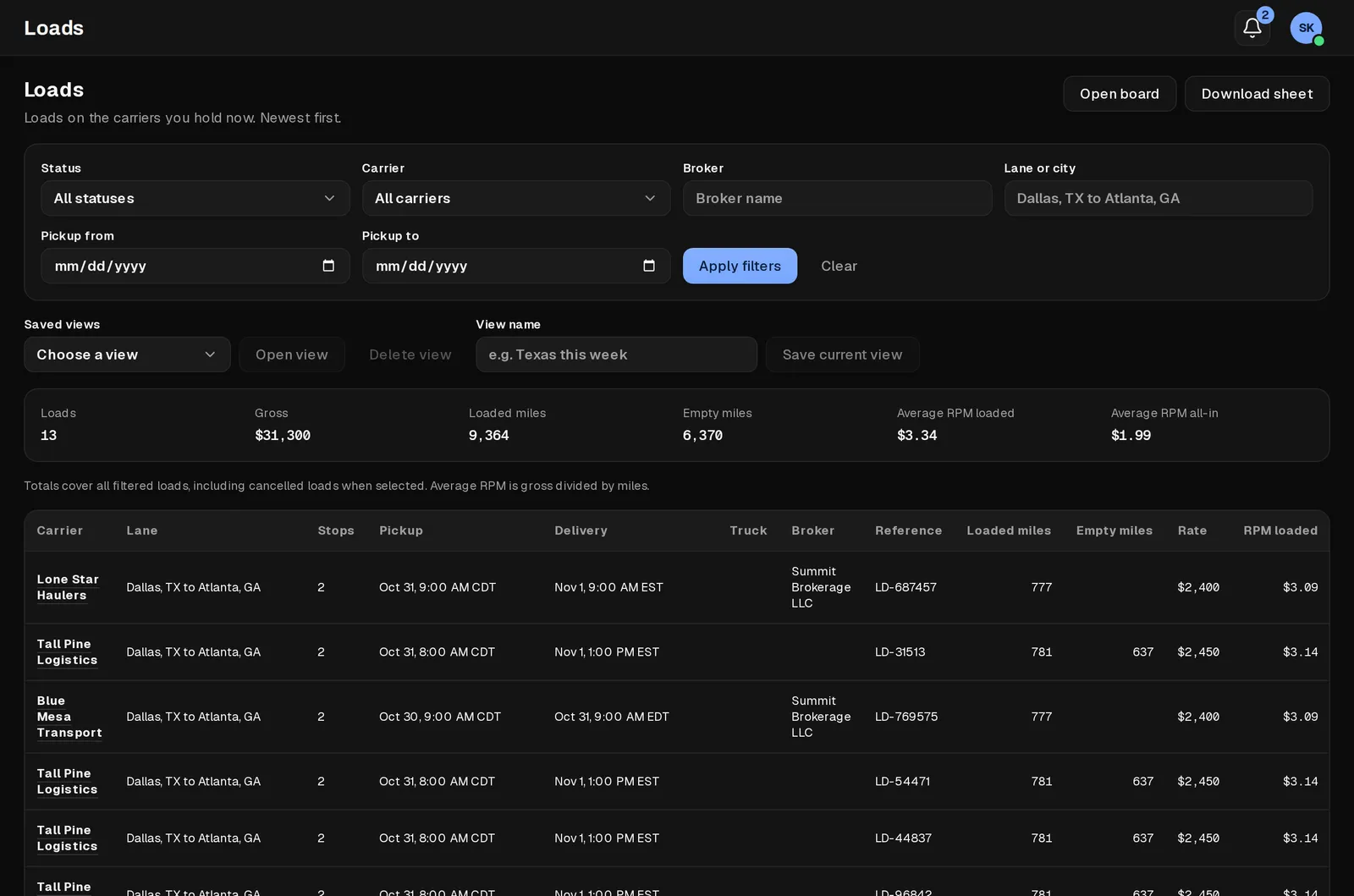
Log a load with its lane, stops, pickup and delivery times, broker, reference number, rate, and loaded and empty miles. The Loads view adds up whatever you filter: number of loads, gross, loaded miles, empty miles, rate per loaded mile and rate per total mile.
Save the views you open every day, such as one broker, one lane or this week, and export any view to CSV or Excel when an owner or a factoring company asks for it.
- Trip planner: paste a lane to get miles, drive time and a route map
- Accessorial charges on the load (detention, layover, TONU, lumper, driver assist), each requested and then approved or denied
- A load status flow from booked to delivered, with cancelled loads kept out of the totals unless you include them
Rate confirmations filled and signed in the browser
Open the broker's rate confirmation PDF on the load, fill it in the browser, place your saved signature and keep the signed copy on that load. A signature is drawn, typed or uploaded once and then placed by dragging and resizing it.
Before anyone signs for a carrier, KeepCarrier asks for that carrier's written permission and keeps it with the record, so the question of who agreed to what never depends on a chat message.
Invoices and weekly statements without the spreadsheet
Set each carrier's dispatch fee as a percentage of gross or a flat weekly amount. Every week KeepCarrier prepares the carrier's settlement from the loads on the board: gross per load, your fee, other costs and what the carrier nets.
Invoices carry your logo and company details and export as a real PDF. A ledger keeps what was billed, what was paid and what is still open for every carrier.
Coming from Google Sheets? Import your carrier list once. From then on the board, statements and ledger keep the records the sheet used to hold.
| In the spreadsheet | In KeepCarrier |
|---|---|
| Carrier register tab: name, MC, truck type, WhatsApp group, dispatch percent | A carrier card and record with MC and DOT number, equipment, labels, saved WhatsApp number or group and dispatch fee |
| Daily status column | A stage column plus a due time on every card |
| Invoice and percent tab: gross, fee, paid, balance | Weekly statements, invoice PDFs and a fee ledger |
| Rate cons in email and a printer | Filled, signed and saved on the load |
| Documents in folders and chats | Documents on the carrier and on each load |
Documents, insurance and the carrier's own view
- Documents on every carrier and every load: authority letter, W-9, certificate of insurance, signed agreement, rate confirmations, bills of lading and proof of delivery
- A COI renewals list that shows which insurance certificates expire soon
- Carrier facts the dispatcher keeps: hazmat, TWIC, insurance agent and factoring company
- A directory of the brokers, shippers and receivers your organization works with
- A private carrier view link where the carrier sees their own loads, statements and documents, sends paperwork and messages you, and nothing else
Sales and dispatch on one record
When a sales agent marks a carrier Interested, they write a handoff note and the carrier goes to your dispatchers. The first dispatcher to take it owns it, and the sales history comes along: calls, notes, and what the owner said about lanes and rates.
A carrier becomes Active when its first load is booked, so the agent who signed it gets credit for a real client rather than a promise.
Admins see every board, assign or reassign carriers between dispatchers, and read each carrier's timeline from the first call to the latest load. Load options go to a carrier's saved WhatsApp chat or group from the card.
Questions
Who is this dispatch software for?
Truck dispatch companies that find their own carriers, often with a sales team calling owner-operators, and the dispatchers who book loads for those carriers. It works for a single dispatcher and for a floor of sales agents and dispatchers.
Does KeepCarrier include a load board?
No. Your dispatchers book loads with brokers and shippers as they do today and log them on the load. KeepCarrier keeps the board, rate confirmations, documents, statements and invoices organized around those loads.
What does a dispatcher seat cost?
A dispatcher takes a seat like a sales agent, at the same price. The 7-day free trial includes 2 sales agents and 1 dispatcher, with no credit card.
Can I move my Google Sheet into KeepCarrier?
Yes. Import your carrier list once from a spreadsheet, then run new loads, statements and invoices in KeepCarrier. Many teams keep the old sheet read-only for a week to compare.
Can carriers see their own loads?
Yes, through a private carrier view link you share. It shows that carrier's loads, statements and documents and nothing about other carriers or your sales work.
Does it work on a phone?
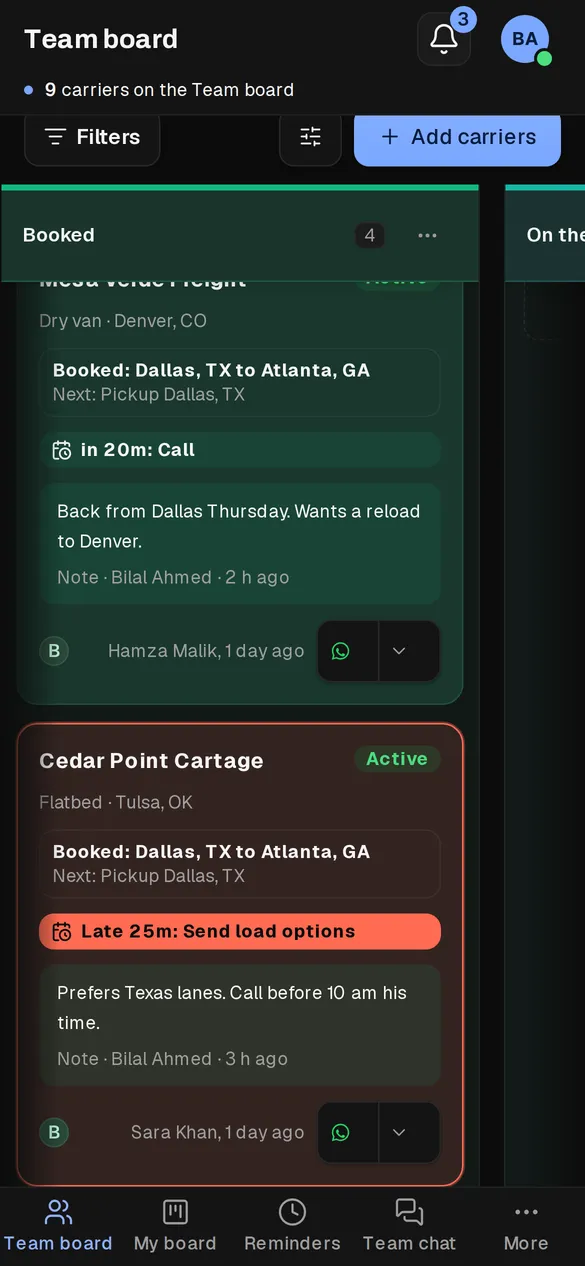
Yes. Dispatchers can check what is due or late, open a carrier record and move carriers between columns from a phone browser.
Put your dispatch floor on one board
Start the 7-day trial with 2 sales agents and 1 dispatcher. Bring one carrier over from your sheet and run its week in KeepCarrier.