Dispatch board software that replaces your Google Sheet
Most dispatch teams start on a shared spreadsheet: one tab for carriers, one for daily status, one for invoices. KeepCarrier turns those tabs into a live board where every carrier has an owner, a stage and a next step with a time on it.
Trial includes 2 sales agents and 1 dispatcher. No credit card.
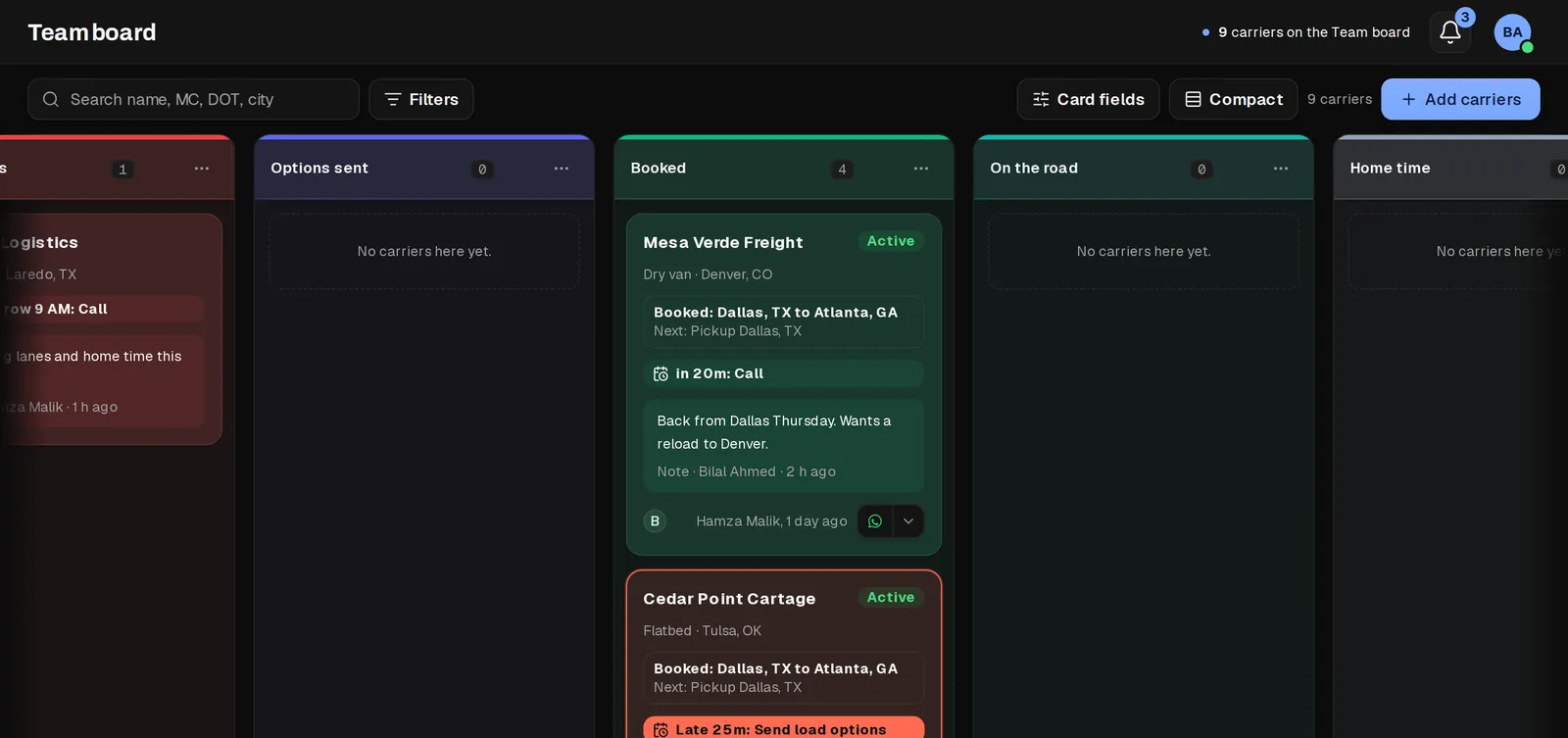
Five ways a dispatch spreadsheet breaks as you grow
- No reminders. A sheet cannot tell you that a carrier has been waiting forty minutes for load options.
- No owner. Two dispatchers call the same carrier about the same load, or each assumes the other did.
- Overwrites. Someone sorts one column and the statuses no longer line up with the carriers.
- Money in another tab. Monday's gross and Friday's invoice are typed twice and rarely match.
- No history. When a dispatcher leaves, the notes and documents leave with their chats.
How the board is set up
- Start from the template columns or name your own stages.
- Add your carriers by MC or DOT number, one at a time or in bulk.
- Create the color labels your team will share, such as Hazmat, Slow to pay or Team drivers.
- Each dispatcher works their own carriers; admins see every board and can reassign.
- Set a reminder on a card whenever you promise a carrier something, and the board keeps the promise visible.
Reminders that look like an alert
A card that is due rises to the top of its column. A late card turns red and says how late it is, for example Late 25m: Follow up. The rest of the board stays calm, so the cards that need someone stand out at a glance.
Reminders exist only when a dispatcher sets them. KeepCarrier does not invent its own tasks, so a red card always means a person promised something.
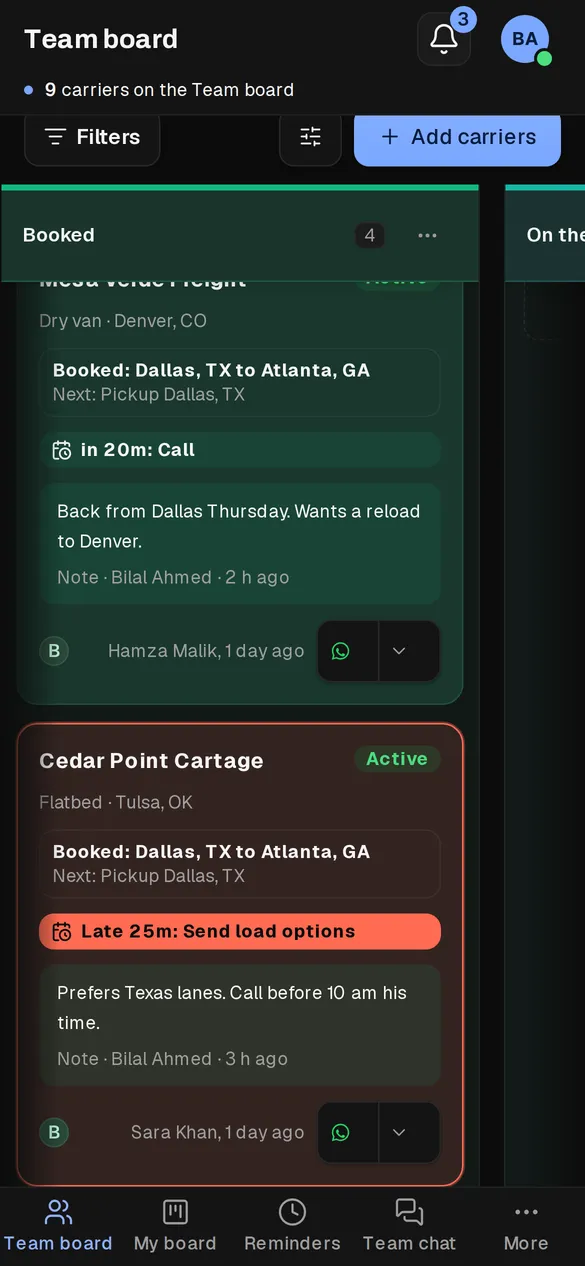
Everything about the carrier one click away
Open a card and the carrier record opens with tabs for facts, documents, loads and a timeline of everything that happened, from the first sales call to the latest load. Next and previous move through the carriers in the column without going back to the board.
Loads, rate confirmations, weekly statements and invoices hang off the same record, which is why the board can replace the other tabs of the sheet as well as the status column.
Spreadsheet tabs and where they go
| In the sheet | On the board |
|---|---|
| Carrier MC register: name, MC, truck type, WhatsApp group, dispatch percent | Carrier card and record: MC and DOT number, equipment, labels, saved WhatsApp number or group, dispatch fee |
| Daily status | Stage column plus a due time on the card |
| Invoice and percent: gross, booking MC, fee, paid, balance | Weekly statement, invoice PDF and fee ledger |
| Comments column | Notes and a timeline that keeps every change |
| Shared drive folder | Documents on the carrier and on each load |
Moving over without stopping work
- Import the carrier list from your sheet.
- Log new loads in KeepCarrier from the next Monday.
- Keep the sheet read-only for one week as a reference.
- Prepare that week's statements in KeepCarrier and compare them with the sheet before you send them.
Questions
What is a dispatch board?
A dispatch board is the screen a dispatcher works from all day: every carrier they handle, the stage each one is in and what has to happen next. In truck dispatching it tracks carriers waiting for loads, options sent, loads booked, trucks on the road and carriers on home time.
Is there a dispatch board template?
Yes. The board starts with common stages (New, Confirming, Needs loads, Options sent, Booked, On the road and Home time) that you can rename, reorder, color or delete.
Can I keep using Google Sheets alongside it?
During the switch, yes. Most teams keep the old sheet read-only for a week to compare, then stop updating it.
Can each dispatcher have their own board?
Each dispatcher works the carriers they hold, and an admin sees all of them. Labels are shared across the organization so everyone filters the same way.
Does it work on a phone?
Yes. Check what is due or late, open a carrier and move it to another column from a phone browser.
Retire the dispatch spreadsheet
Start the 7-day trial with 2 sales agents and 1 dispatcher. Import your carriers and run next week on the board.