Everything your dispatch team does, after the right carrier says yes
Your agents find the carriers worth calling. Once one says yes, dispatch takes over in the same workspace: a board with Focus mode, load options, a link the carrier works themselves, Dispatch Mail with an AI draft, and a weekly statement for every carrier.
Trial includes 2 sales agents and 1 dispatcher. No credit card.
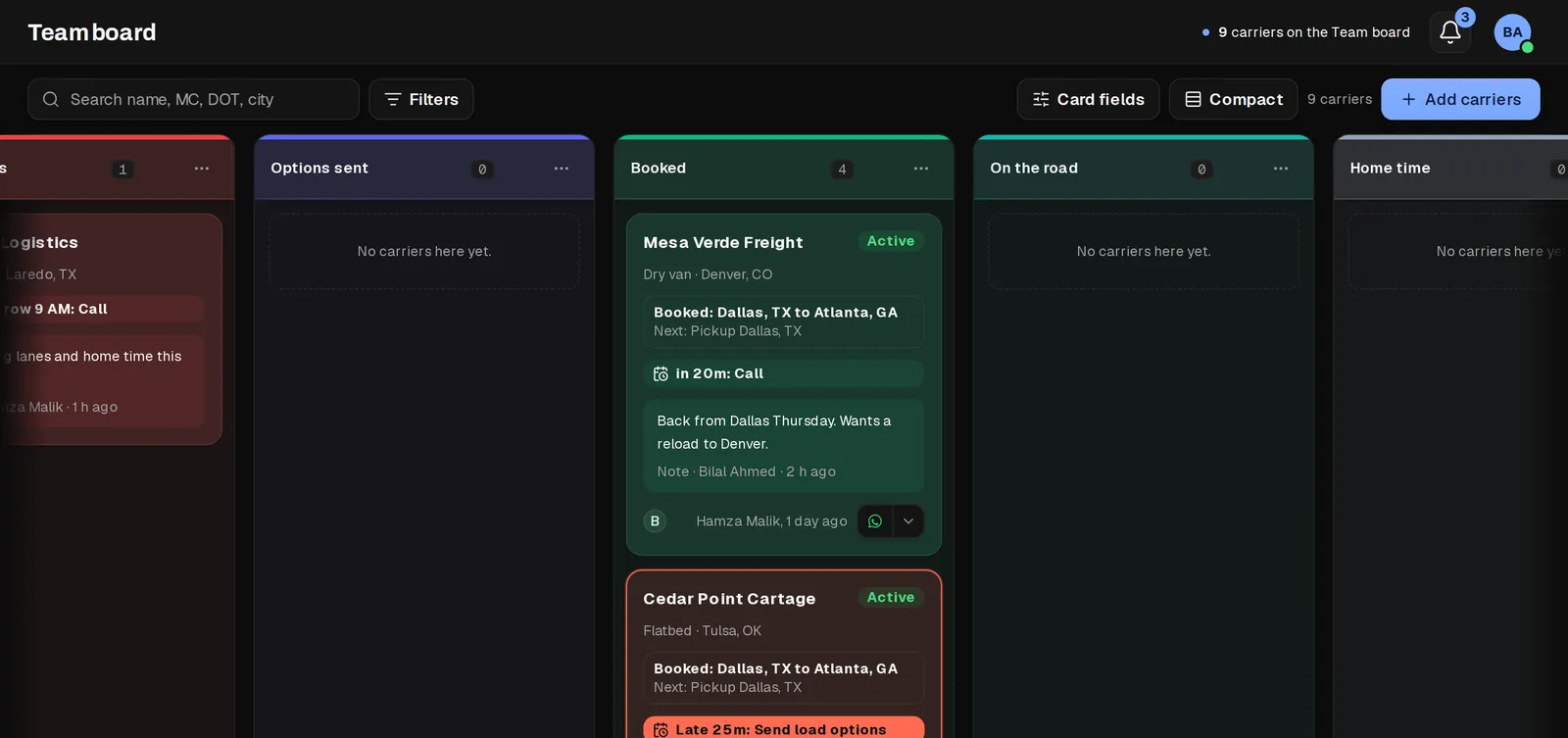
The board, and Focus mode for the due ones
Each carrier is a card with its own stage and its next step. A card that is due rises to the top of its column, and a late one turns red with how late it is.
Focus mode opens the due carriers one at a time and moves to the next one by itself, so working a list of reminders takes one pass, not a hunt across every column.
- Color labels your whole team shares, with a filter for each one
- Reminders exist only when a dispatcher sets one, so the board never fills with automatic noise
- A recycle bin, so a removed carrier can come back
Load options, and the Loads view with the numbers
Send up to five load options with the rate per mile shown live, loaded and all in. Each one goes out by WhatsApp chat, WhatsApp group or copy, and sending it logs the message and moves the card.
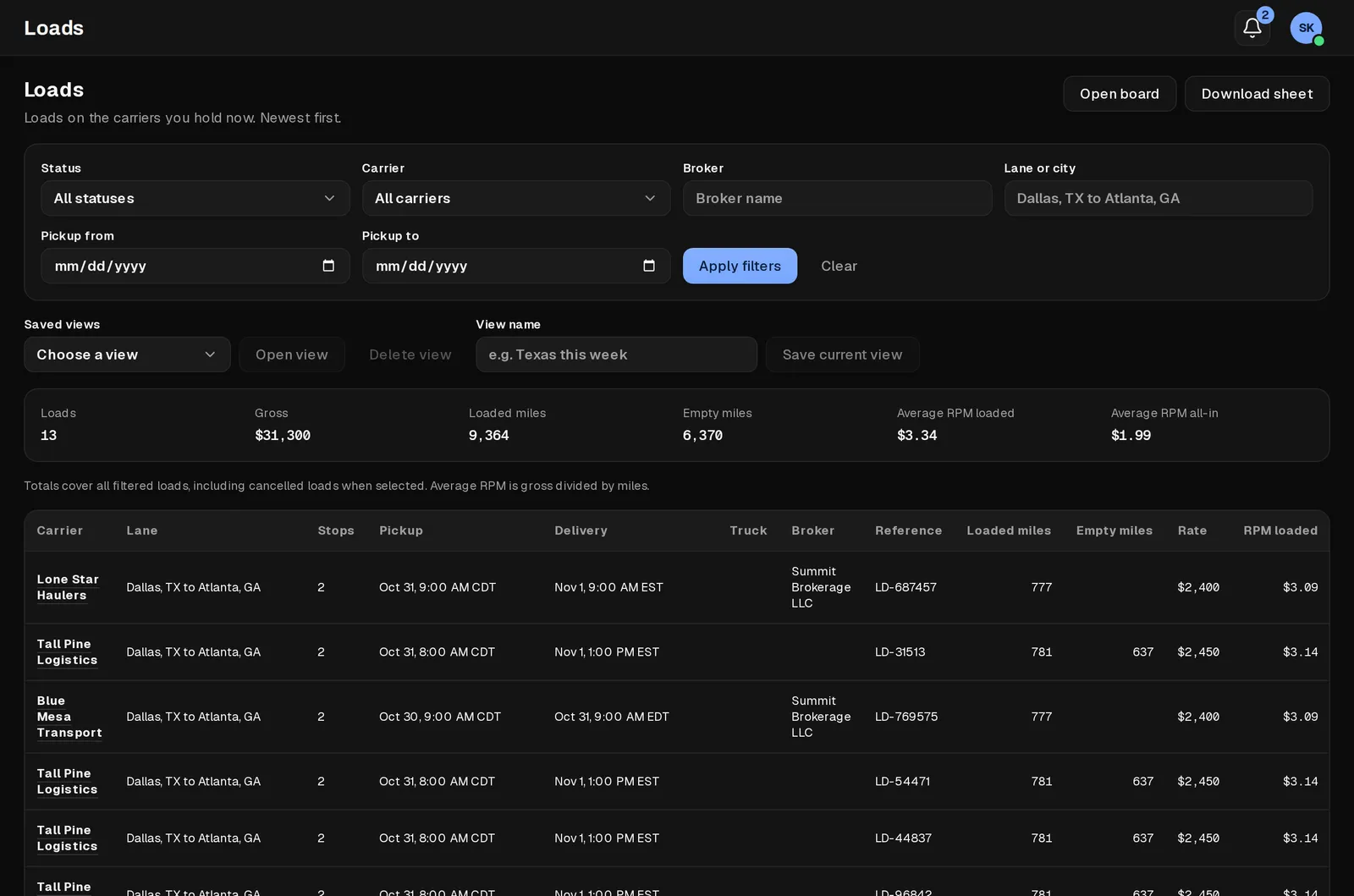
The Loads view adds up whatever you filter: number of loads, gross, loaded miles, empty miles and rate per mile, loaded and all in.
The carrier's own link
Carriers get a private link: their loads, documents and statements, and nothing about anyone else's. They pick the load option they want, send their paperwork and photos straight onto the load, and can share where the truck is on a load that is booked or on the road.
A chat thread sits on the same link, so the two sides stop talking on WhatsApp, where nobody else on the team can read it. The carrier can turn on alerts for a new message or new load options, right from their phone.
- Proof of delivery, bills of lading and lumper receipts sent straight onto the load
- Their own papers (insurance, W-9, NOA, authority letter) sent once and kept on the carrier
- One tap to share the truck's position on a booked load, and one tap to stop
Dispatch Mail
Each dispatcher connects their own mailbox and reads broker and carrier mail without leaving the board. A long thread gets one button for a summary, and every incoming message carries a plain label such as rate confirmation, load offer or payment.
Ask for an AI draft of the reply. It fills the composer above the quoted message. Nothing sends until the dispatcher reads it, changes it if needed, and presses Send.
Documents and weekly statements
- Authority letter, certificate of insurance, W-9, NOA and signed agreement in one tab, with a reminder before a certificate runs out
- Each load adds to a weekly statement: gross, the dispatch fee, other costs and what the carrier nets
- A statement is ready to send as an invoice, with a ledger of what was billed and what is still open
Questions
Is the dispatch workspace a separate product?
No. It is part of the same KeepCarrier plan your sales agents use, with its own seat for a dispatcher.
Does the carrier need to install anything?
Their link works in a phone browser first. They can also add it to their home screen and turn on alerts, which makes it feel like an app without an app store.
Does Dispatch Mail send mail by itself?
No. An AI draft only fills the reply box. The dispatcher reads it, changes it if needed, and presses Send.
Can I try the dispatch workspace before I commit?
Yes. The 7-day free trial includes 2 sales agents and 1 dispatcher, and dispatch is part of it, with no credit card.
Give your dispatch team the whole workspace
Start the 7-day trial with 2 sales agents and 1 dispatcher. A carrier who says yes moves straight from sales to the board, the link and Dispatch Mail.